


Page 48 - Inner-3
P. 48
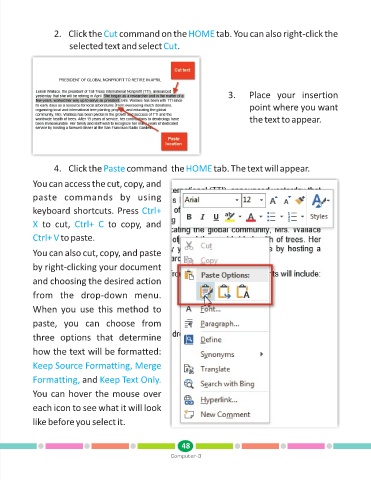
2. Click the Cut       command on the HOME              tab. You can also right-click the

                         selected text and select Cut        .


                                                                              3.      Place  your  insertion

                                                                                      point where you want
                                                                                      the text to appear.


                   4. Click the Paste        command  the HOME            tab. The text will appear.

            You can access the cut, copy, and

            paste  commands  by  using

            keyboard shortcuts. Press Ctrl+
            X   to  cut,  Ctrl+  C    to  copy,  and

            Ctrl+ V   to paste.


            You can also cut, copy, and paste

            by right-clicking your document

            and choosing the desired action

            from  the  drop-down  menu.

            When  you  use  this  method  to

            paste,  you  can  choose  from
            three  options  that  determine


            how the text will be formatted:
            Keep Source Formatting, Merge


            Formatting,      and Keep Text Only.
            You can hover the mouse over


            each icon to see what it will look
            like before you select it.


                                                               48
                                                           Computer-3

