


Page 43 - Inner-3
P. 43
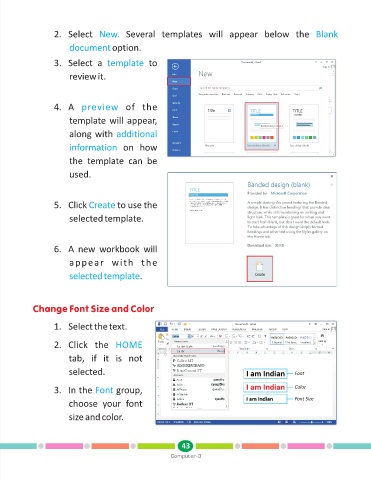
2. Select  New.          Several  templates  will  appear  below  the  Blank

                         document       option.

                   3. Select  a  template           to

                         review it.


                   4. A  preview           of  the

                         template will appear,

                         along with additional
                         information       on  how

                         the  template  can  be

                         used.


                   5. Click Create       to use the

                         selected template.


                   6. A  new  workbook  will

                         appear  with  the

                         selected template       .


            Change Font Size and Color


                   1. Select the text.


                   2. Click  the  HOME

                        tab,  if  it  is  not

                        selected.                                                                    Font


                   3. In the Font        group,                                                      Color
                                                                                                     Font Size
                        choose  your  font
                        size and color.


                                                               43
                                                           Computer-3

