


Page 41 - Inner-3
P. 41
Creating a New Document


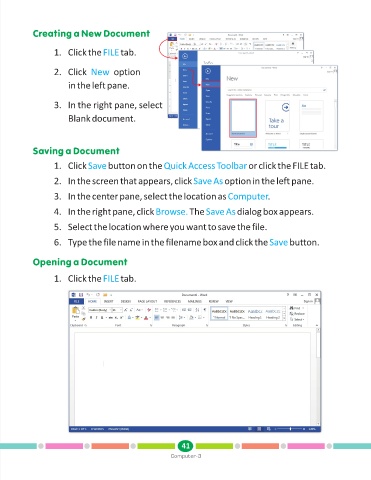
                   1. Click the FILE       tab.


                   2. Click  New        option

                        in the left pane.


                   3. In the right pane, select

                        Blank document.


            Saving a Document

                   1. Click Save      button on the Quick Access Toolbar              or click the FILE tab.

                   2. In the screen that appears, click Save As               option in the left pane.


                   3. In the center pane, select the location as Computer                   .

                   4. In the right pane, click Browse.           The Save As      dialog box appears.

                   5. Select the location where you want to save the file.

                   6. Type the file name in the filename box and click the Save                     button.


            Opening a Document

                   1. Click the FILE       tab.


                                                               41
                                                           Computer-3

