


Page 40 - Inner-3
P. 40
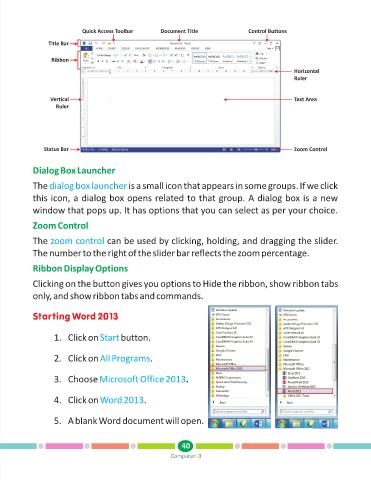
Quick Access Toolbar       Document Title               Control Buttons

                 Title Bar

                  Ribbon
                                                                                                     Horizontal
                                                                                                     Ruler


                  Vertical                                                                           Text Area
                    Ruler


                Status Bar                                                                           Zoom Control


            Dialog Box Launcher

            The dialog box launcher          is a small icon that appears in some groups. If we click

            this icon, a dialog box opens related to that group. A dialog box is a new

            window that pops up. It has options that you can select as per your choice.

            Zoom Control

            The zoom control         can be used by clicking, holding, and dragging the slider.

            The number to the right of the slider bar reflects the zoom percentage.

            Ribbon Display Options

            Clicking on the button gives you options to Hide the ribbon, show ribbon tabs

            only, and show ribbon tabs and commands.


                                    0
            Starting Word 2 13


                   1. Click on Start       button.


                   2. Click on All Programs         .


                   3. Choose Microsoft Office 2013              .


                   4. Click on Word 2013          .


                   5. A blank Word document will open.


                                                               40
                                                           Computer-3

