


Page 58 - Inner-3
P. 58
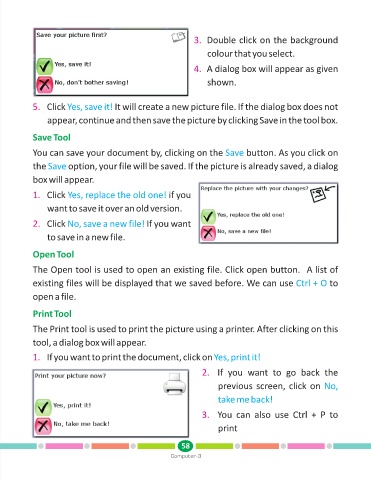
3. Double click on the background
                                                                       colour that you select.


                                                                   4. A dialog box will appear as given
                                                                       shown.


            5. Click Yes, save it!      It will create a new picture file. If the dialog box does not
                 appear, continue and then save the picture by clicking Save in the tool box.


            Save Tool

            You can save your document by, clicking on the Save                      button. As you click on

            the Save     option, your file will be saved. If the picture is already saved, a dialog

            box will appear.

            1. Click Yes, replace the old one!             if you

                 want to save it over an old version.

            2. Click No, save a new file!          If you want

                 to save in a new file.


            Open Tool

            The Open tool is used to open an existing file. Click open button.  A list of

            existing files will be displayed that we saved before. We can use Ctrl + O                           to

            open a file.


            Print Tool

            The Print tool is used to print the picture using a printer. After clicking on this

            tool, a dialog box will appear.

            1. If you want to print the document, click on Yes, print it!

                                                                      2. If  you  want  to  go  back  the

                                                                           previous screen, click on No,

                                                                           take me back!

                                                                      3. You  can  also  use  Ctrl  +  P  to

                                                                           print


                                                               58
                                                           Computer-3

